ZT3 Pro / G3 Max / F3 / F3 Pro & GT3 Unlocking Guide
Complete guide to unlocking your dashboard using x3utils.
Important Notice
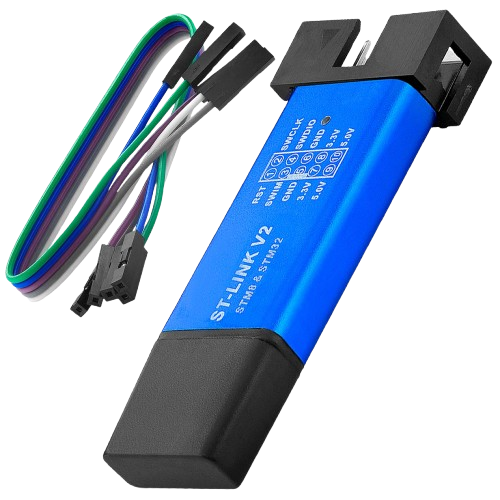
Unlocking via Bluetooth apps is no longer possible because Segway patched it. You must use the ST-LINK hardware method below.
Troubleshooting
Error "Check ST-Link connection"? Don't hold the blinker buttons. Short GND from ST-Link to C45.
After Unlocking
The Scooter hacking utility (v3) app is still completely usable after unlocking with the ST-LINK.
Get SHU v3 (Android Only)Warning
Do not update your scooter via the official Segway app after unlocking, or you will lose your unlocked state!
Step-by-Step Instructions
- Disconnect the dashboard from the power supply.
- Connect pins SWDIO, SWCLK, GND, 3.3V to the ST-Link.
- Press and hold both Left & Right indicator buttons.
- Start x3utils launcher, then plug ST-Link into USB.
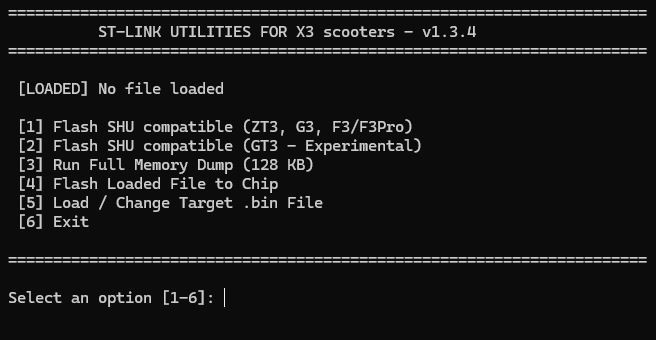
- Run Full Memory Dump (Safety first!)
- Select 1/2 (choose your scooter model)
Community Support
Join our Discord servers for real-time assistance.
Disclaimer
Disclaimer: This site is not affiliated, associated, or in any way officially connected with SHU (Scooter Hacking Utility).